

For a very long time, in order to run ads, you had to create a business page. It didn’t matter if it was a company or a blogger who needed to launch ads and promote their posts.
In the fall of 2022, Facebook announced the introduction of a professional mode. It is primarily designed for content creators who want to run ads for their profile and posts, track their content statistics, and monetize their content.
How to turn on Facebook’s professional mode
You can do this from your smartphone and computer. You need to go to your profile, press 3 dots, and find the “Activate Professional Mode” option.

That’s it, you now have a professional profile on Facebook. This is a kind of analog of a profile for content creators on Instagram.
How your profile will look to others
The emphasis is now on the number of subscribers. This is the first thing you immediately notice.

In addition, the “About” section appears, which contains a profile transparency block, information about active advertising, and profile ID. Previously, this was only available for business pages on Facebook.

How to run ads from your personal Facebook profile
If you need to promote a specific post, the Boost button will appear next to it.
There will also be an “Advertise” button in your profile next to your avatar, which will take you to the ad launcher.
You can run ads using 5 goals:
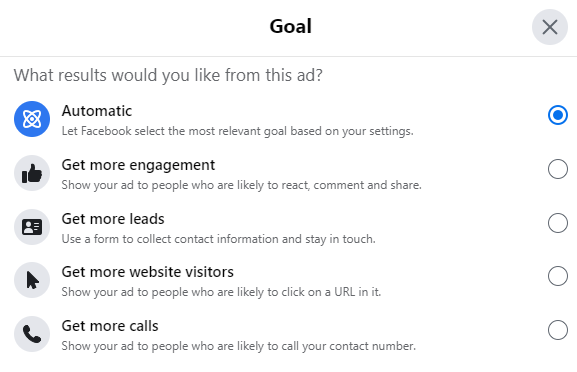
You can also choose an advertising account in which to create an advertising campaign and where audiences will be pulled from. Unfortunately, you cannot run ads through Ads Manager. The system allows us to use only a simplified interface:

On the other hand, we can use any custom audiences that we have in our ad account (including website visitors, Instagram followers, Lookalikes, etc.) This is very cool and will allow us to advertise posts to the exact audience segment we need:

Auto-promotion of Facebook posts
It’s a pretty interesting feature for those who don’t understand advertising and don’t want to bother with it. But they need each post to be promoted to increase the reach and number of reactions. For this purpose, there is an auto-promotion mode:

We can customize how much money and how many days to promote each post. The system will do it all automatically.
What should I do if the advertising section does not appear?
This can also happen. I’ve encountered such cases, but I couldn’t solve them quickly because they were other people’s profiles and it’s difficult to communicate with support when you don’t have access to the profile.
Here are 2 options for how support suggests solving this problem:
- Contact support directly via chat/email using this link: https://www.facebook.com/business/help
Take a screenshot and video of your screen in advance, where you can see that you don’t have a “Promote” button and “Professional Mode” is enabled. - Submit a problem form and report it directly to the internal team for them to review account.
To do so:- Go to your profile
- Click the your profile icon on the upper right hand corner of the screen
- Click Help & Support
- Click Report a problem and fill up the form
- The report will then be reviewed internally and yur client will get an update on his Support Inbox.


